
Like any good social media lover, I love to post my travel photos and experiences on Instagram, Facebook and Twitter. Not only do I enjoy sharing my experiences, I use my photos and updates as a mini-scrapbook so I can remember everything when I want to go back and write a blog post or do some scrapbooking.
But often I don’t want to publicize the fact that I am away from home, or where I might be at any given time with my children. Evernote to the rescue.
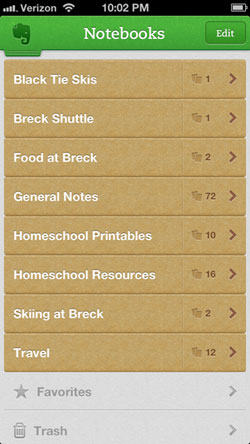
Evernote is a note-taking system that offers a web client, software download, and mobile app – and syncs automatically between the three. I can easily make a note using my smartphone by typing – or talking, since it will record voice – adding a photo and saving. When I get home from a trip, all my photos and memories are waiting for me to revisit, upload to social media, scrapbook, or blog.
Here’s my memory-saving strategy for Evernote, using their iPhone app:
1. Create a notebook for your trip. You can use any method that makes sense to your brain. I like to make notebooks for each aspect of my trip – activities, food, transportation, etc. This allows me to easily access and organize each experience.
2. Within your notebook(s), create a quick note for every activity, meal, and experience as it happens. Your note can be as simple as the name of a restaurant. Creating the note will record the date and time of your visit and embed this information in the note.
3. Take notes. I struggle with constantly wanting to note and photograph everything I do – often at the expense of actually experiencing what I’m doing. Find a balance. The great thing about Evernote is that you can speak and it will record your voice. Talk or type a few words that will help you recall your feelings and experiences without keeping your nose stuck in your phone the whole time.
4. Add photos to the note(s). This is quicker than posting a photo to Facebook, Twitter or Instagram because you don’t have to stop and compose a clever status update to accompany your photo. Save that for later. Just attach your photos to your notes and you’ll be all set to upload those #latergrams when you get home.
And remember, all these notes sync up with the web client and your desktop client, so you can access them easily on your computer when you want to blog. Evernote has a lot of additional features that make it awesome, like the new Evernote Hello that helps you remember the people you meet. It’s one of my favorite apps and it definitely makes my travel memories more memorable.
Spizzio says
Thanks for the tips, we’re going on a road trip this summer from Orange County to Yellowstone. Going to definitely try using Evernote, I think using the photographs to notes portion is going to work out great for my purpose. Reminds me of the old days when you carried around a portable tape recorder.
Kate says
I kept a diary in my iPhone (just the notes app) on my honeymoon but this would have made it so much easier. I will definitely use this method in the future.